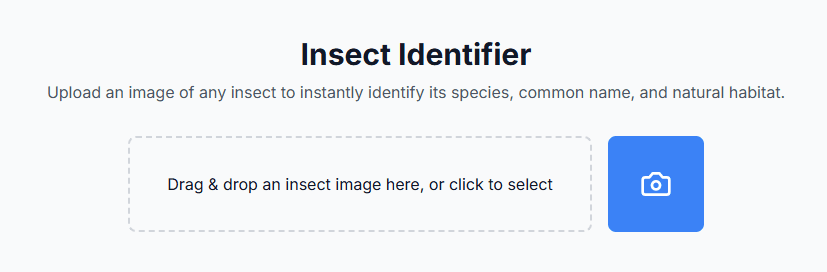
Core Features
- Image upload via drag-drop
- Camera capture on mobile
- Insect identification using Gemini AI
- Display results in formatted table
Here is what we will do.
Here’s how to build the Insect Identifier app:
- Setup Requirements
- Node.js installed
- Nextjs installed
- Google Gemini API key (Deprecated on 12 July 2024, will be using gemini-1.5 flash)
- Code editor (VS Code recommended) today lesson, will be using Replit
- Installing Dependencies
- Create Google Gemini API Key
- Create Folder Structure & Code Insertion
- Running The App
Installing Dependencies & Create Google Gemini API Key:
npx create-next-app@latest insect-identifier --typescript --tailwind
npm install @google/generative-ai react-dropzone lucide-react
Complete folder structure
src/
├── app/
│   ├── api/
│   │   └── identify/
│   │       └── route.ts        # API endpoint for Gemini
│   ├── components/
│   │   ├── ImageUpload.tsx     # Image upload & camera component
│   │   └── InsectInfo.tsx      # Results display component
│   ├── lib/
│   │   └── gemini.ts          # Gemini client setup
│   └── page.tsx               # Main page component
├── .env.local                 # Environment variables
└── package.json
Step 1:
// lib/gemini.ts
import { GoogleGenerativeAI } from "@google/generative-ai";

const genAI = new GoogleGenerativeAI('process.env.NEXT_PUBLIC_GOOGLE_API_KEY!');

export async function identifyInsect(imageBase64: string) {
  const model = genAI.getGenerativeModel({ model: "gemini-1.5-flash" });

  const result = await model.generateContent([
    "Identify this insect and provide its scientific name, common name, habitat, and interesting facts.",
    {
      inlineData: {
        mimeType: "image/jpeg",
        data: imageBase64.split(",")[1]
      }
    }
  ]);

  return result.response.text();
}
Step 2:
// app/api/identify/route.ts
import { identifyInsect } from '../../../lib/gemini';
import { NextRequest, NextResponse } from 'next/server';

export async function POST(req: NextRequest) {
  try {
    const { image } = await req.json();
    console.log("Received image data"); // Debug log

    const result = await identifyInsect(image);
    console.log("Gemini result:", result); // Debug log

    return NextResponse.json({ result });
  } catch (error) {
    console.error("Error in API route:", error); // Detailed error logging
    return NextResponse.json({ error: String(error) }, { status: 500 });
  }
}
Step 3:
// components/ImageUpload.tsx
import { useCallback, useState } from 'react';
import { useDropzone } from 'react-dropzone';
import { Camera } from 'lucide-react';

export default function ImageUpload({ onUpload }: { onUpload: (base64: string) => void }) {
  const [preview, setPreview] = useState<string>('');

  const processFile = (file: File) => {
    const reader = new FileReader();
    reader.onload = (e) => {
      const base64 = e.target?.result as string;
      setPreview(base64);
      onUpload(base64);
    };
    reader.readAsDataURL(file);
  };

  const onDrop = useCallback((acceptedFiles: File[]) => {
    processFile(acceptedFiles[0]);
  }, []);

  const handleCameraCapture = (e: React.ChangeEvent<HTMLInputElement>) => {
    if (e.target.files && e.target.files[0]) {
      processFile(e.target.files[0]);
    }
  };

  const { getRootProps, getInputProps } = useDropzone({
    onDrop,
    accept: {'image/*': []},
    maxFiles: 1
  });

  return (
    <div className="w-full max-w-xl mx-auto">
      <div className="flex gap-4 justify-center mb-4">
        <div
          {...getRootProps()}
          className="flex-1 border-2 border-dashed border-gray-300 rounded-lg p-8 text-center cursor-pointer hover:border-blue-500 h-24 flex items-center justify-center"
        >
          <input {...getInputProps()} />
          <p>Drag & drop an insect image here, or click to select</p>
        </div>
        <label className="flex items-center justify-center w-24 h-24 bg-blue-500 hover:bg-blue-600 rounded-lg cursor-pointer">
          <input
            type="file"
            accept="image/*"
            capture="environment"
            onChange={handleCameraCapture}
            className="hidden"
          />
          <Camera className="w-8 h-8 text-white" />
        </label>
      </div>
      {preview && (
        <div className="mt-4">
          <img src={preview} alt="Preview" className="max-w-full rounded-lg" />
        </div>
      )}
    </div>
  );
}
Step 4:
// components/InsectInfo.tsx
export default function InsectInfo({ data }: { data: string }) {
  const parseInsectData = (text: string) => {
    const lines = text.split('\n');
    const info: Record<string, string> = {
      'Scientific Name': '',
      'Common Name': '',
      'Habitat': ''
    };

    lines.forEach(line => {
      if (line.toLowerCase().includes('scientific name')) {
        info['Scientific Name'] = line.split(':')[1]?.trim().replace(/\*\*/g, '') || '';
      } else if (line.toLowerCase().includes('common name')) {
        info['Common Name'] = line.split(':')[1]?.trim().replace(/\*\*/g, '') || '';
      } else if (line.toLowerCase().includes('habitat')) {
        info['Habitat'] = line.split(':')[1]?.trim().replace(/\*\*/g, '') || '';
      }
    });

    return info;
  };

  const insectData = parseInsectData(data);

  return (
    <div className="mt-8 p-6 bg-white rounded-lg shadow-lg">
      <table className="w-full border-collapse text-gray-900">
        <tbody>
          {Object.entries(insectData).map(([key, value]) => (
            <tr key={key} className="border-b border-gray-200">
              <td className="py-3 px-4 font-semibold text-blue-600">{key}</td>
              <td className="py-3 px-4 text-gray-700">{value}</td>
            </tr>
          ))}
        </tbody>
      </table>
    </div>
  );
}
Step 5:
// app/page.tsx
'use client';

import { useState } from 'react';
import ImageUpload from './components/ImageUpload';
import InsectInfo from './components/InsectInfo';

export default function Home() {
  const [insectInfo, setInsectInfo] = useState<string>('');
  const [loading, setLoading] = useState(false);

  const handleUpload = async (base64: string) => {
    setLoading(true);
    try {
      const res = await fetch('/api/identify', {
        method: 'POST',
        headers: { 'Content-Type': 'application/json' },
        body: JSON.stringify({ image: base64 }),
      });

      if (!res.ok) {
        const errorData = await res.json();
        throw new Error(errorData.error);
      }

      const data = await res.json();
      setInsectInfo(data.result);
    } catch (error) {
      console.error("Upload error:", error);
      alert("Error identifying insect: " + error);
    }
    setLoading(false);
  };

  return (
    <main className="min-h-screen bg-gray-50 py-12 px-4 text-gray-900">
       <div className="max-w-4xl mx-auto">
         <h1 className="text-3xl font-bold text-center mb-2 text-gray-900">Insect Identifier</h1>
         <p className="text-center mb-8 text-gray-600">
           Upload an image of any insect to instantly identify its species, common name, and natural habitat.
         </p>
         <ImageUpload onUpload={handleUpload} />
         {loading && <p className="text-center mt-4 text-gray-900">Identifying insect...</p>}
         {insectInfo && <InsectInfo data={insectInfo} />}
       </div>
     </main>
  );
}